Review
GetResponse Review 2026: Is the All-in-One Email, Automation, and Webinar Platform Worth It?
Most email tools ask you to pick a lane: be a newsletter platform, or a funnel builder, or a webinar host, and buy the other two elsewhere. GetResponse has spent years arguing you shouldn’t have to. Email campaigns and automation, a landing page and website builder, sales funnels, live webinar hosting, and a course creator all live inside one login and one bill — a genuinely unusual combination for a tool that started life as a plain email service provider.
That breadth is GetResponse’s whole pitch, and it’s a real one for a solopreneur trying to avoid five separate subscriptions. But an all-in-one platform is a series of trade-offs, and the honest questions for 2026 are how much of that breadth you actually get on the free plan, how quickly the pricing climbs once you need real automation, and whether the parts that make GetResponse different from a plain email tool — webinars especially — hold up once you rely on them.
What GetResponse actually is
GetResponse is a browser-based marketing platform built around five core pieces: email campaigns and autoresponders, a visual marketing automation builder, landing pages with a lightweight website builder, sales funnels with abandoned-cart recovery and promo codes, and — its clearest differentiator — native webinar hosting and course creation. Everything runs on the same contact database and the same subscription, rather than being stitched together from separate tools.
It’s not trying to be a pure creator tool the way Kit is, and it’s not a flat-rate funnel-first platform the way Systeme.io is. GetResponse sits closer to the middle: an email-first platform that has kept adding adjacent capabilities — most notably webinars, which almost none of its direct competitors offer natively — until it started to look like an all-in-one product by accumulation rather than by original design.
GetResponse
Best for: Solopreneurs who want email, automation, landing pages, and webinars or courses under one login
Starting price: $0/mo (Free plan, 500 contacts)
Pros
- Free plan includes unlimited landing pages, basic automation, and an AI course creator — not just email
- Marketer plan bundles unlimited automation, abandoned cart recovery, and funnels for $59/month at 1,000 contacts
- Creator plan adds native webinar hosting and course creation, rare for an email-first platform
Cons
- Starter plan caps AI tools at 3 uses and withholds advanced segmentation
- Free-plan webinars are capped at 10 attendees and one 30-minute recording
- Interface is busier than a single-purpose tool, since it covers more ground
Who it’s for
GetResponse is built for the solopreneur whose business touches more than one channel — someone who sends email campaigns, runs a lead-magnet funnel, and periodically hosts a live training or webinar as part of a launch. If that’s your actual workflow, having automation, a landing page, and webinar hosting under one login removes real integration work: no separate webinar tool to connect to your email list, no separate funnel builder to wire up to your automation.
It’s a weaker fit if your business is genuinely just a newsletter with no funnel or webinar component — in that case you’re paying for breadth you won’t use, and a creator-first tool with deeper automation may serve you better. It’s also a weaker fit if your list is small and your budget is the binding constraint, since GetResponse’s meaningful automation lives one tier above the cheapest paid plan.
Real 2026 pricing and plan limits
GetResponse’s pricing is metered by contact count and split across three named consumer tiers, plus a custom Enterprise tier. As with most SaaS pricing, the number that gets quoted in marketing depends heavily on whether you’re looking at monthly or annual billing, so it’s worth being precise.
At the 1,000-contact tier, billed monthly: Starter is $19/month, Marketer is $59/month, and Creator is $69/month. Billed annually, all three tiers get an 18% discount, bringing them to roughly $15.58/month, $48.38/month, and $56.58/month respectively. Every paid tier gets more expensive as your contact count grows past 1,000 — Starter, for example, climbs to around $79/month at 10,000 contacts.
The Free plan is genuinely permanent, not just a trial window, though GetResponse’s signup flow can make that easy to miss: every new account first gets 14 days of full premium access (unlimited automation, higher webinar caps, more AI tool uses) with no credit card required. If you don’t upgrade by the end of that window, the account doesn’t disappear — it settles into the actual free tier: 500 contacts, 2,500 emails per month, unlimited landing pages (capped at 1,000 monthly visitors), basic automation workflows (without the dynamic segment filter), signup forms and popups, and the AI course creator for up to 250 students.
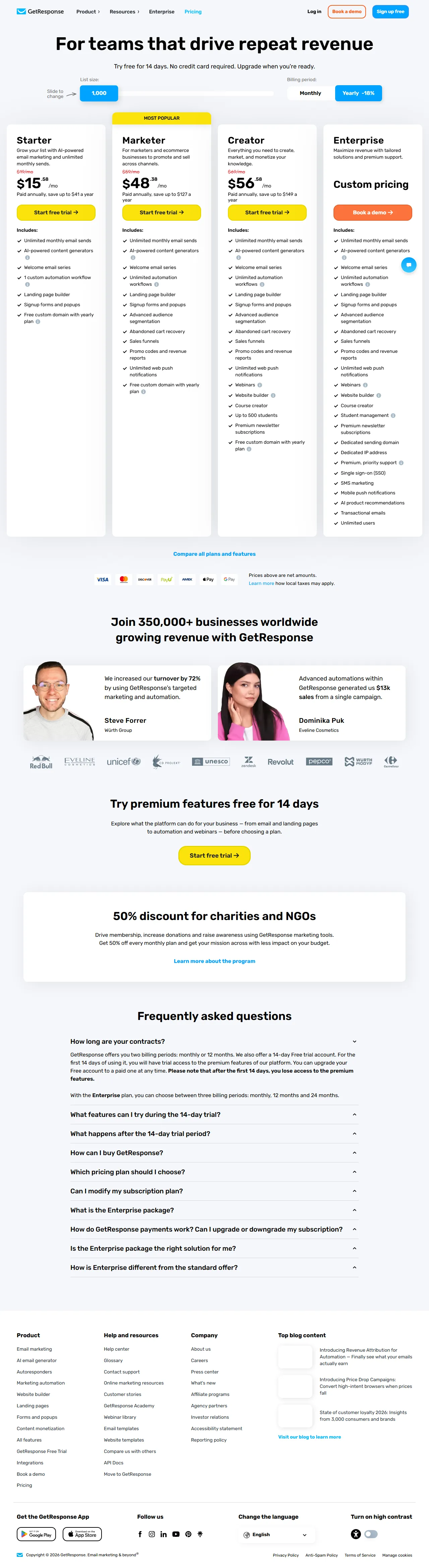
GetResponse pricing page, captured September 2026.
The practical takeaway: budget for the monthly-billed rate if you want flexibility, but know that annual billing saves a meaningful amount — roughly two months’ worth of cost per year — once you’re confident you’re staying. And don’t confuse the 14-day trial’s expanded limits with what you’ll actually have access to once it ends; test the platform against the free plan’s real limits, not the trial’s.
Email campaigns and autoresponders
Core email sending — broadcasts, autoresponder sequences, templates, basic reporting — is competent and available at every tier, including free. GetResponse’s editor has closed most of the design gap against more polished competitors in recent years, and it includes an AI campaign generator even on the free plan, which some competitors reserve for paid tiers. Autoresponder sequences (GetResponse’s term for a time- or trigger-based drip series) work on every plan, though the more advanced trigger logic — behavior- and event-based rather than purely time-based — lives inside the automation builder rather than the autoresponder tool itself.
Marketing automation
This is where the paid tiers earn their keep. The free plan and Starter both include automation workflows, but Starter caps you to a single workflow and withholds the dynamic segment filter — genuinely limiting for anything beyond a basic welcome sequence. Marketer removes that ceiling: unlimited automation workflows, advanced segmentation, abandoned cart recovery, and conditional logic based on subscriber behavior, tags, and purchases.
Compared with a creator-first tool like Kit, GetResponse’s automation canvas is a bit less visually polished but covers the same core ground — branching logic, event triggers, tag-based conditions — at a lower price point for equivalent depth. If automation sophistication is your top priority and you don’t need funnels or webinars, it’s worth comparing both directly; our best email marketing software for solopreneurs roundup lines up the trade-offs.
Landing pages, funnels, and the website builder
GetResponse’s landing pages are available even on the free plan — unlimited pages, capped at 1,000 monthly visitors — and the drag-and-drop editor is fast to use without design experience. Paid plans starting at Marketer add full sales funnels: opt-in pages, sales pages, order bumps, and promo codes, plus abandoned-cart recovery for anyone selling directly. Creator adds a lightweight website builder on top, so you can host a simple site alongside your funnels rather than pointing a domain at a separate CMS.
None of this matches the depth of a dedicated page builder or funnel platform — you’re working inside GetResponse’s own block system rather than a fully free-form canvas, and the website builder in particular is basic next to a purpose-built site tool. For a side-by-side of what a dedicated landing page tool offers instead, see our best landing page builders for solopreneurs guide.
Webinars: the real differentiator
Native webinar hosting is the feature that separates GetResponse from almost every other tool in this category. As of their current pricing pages, none of Kit, MailerLite, beehiiv, or Brevo advertise native webinar hosting; Systeme.io offers automated webinar funnels on its higher tier but not GetResponse’s live-hosting depth. If webinars are part of how you launch — live trainings, Q&A sessions, product demos — having that built into your email platform removes an entire separate subscription and integration.
The catch is where the caps sit. Free-plan and trial webinars are limited to 10 attendees (including you and any co-presenters) and a single recording capped at 30 minutes — fine for testing the feature, not enough for an actual launch. Full webinar hosting, up to 100 attendees, requires the Creator plan at $69/month (1,000 contacts). If webinars are central to your business rather than occasional, that’s the tier to budget for, not Starter or Marketer.
AI tools
GetResponse’s AI features — a campaign and subject-line generator, and an AI course creator — appear across every tier, but usage is capped hard on the cheaper plans. The free plan and trial include AI course creation for up to 250 students; Starter limits general AI tool usage to just 3 uses, which is little more than a demo. Meaningful, repeated use of the AI generators in day-to-day campaign work effectively requires Marketer or above. Treat the AI features as a helpful accelerant once you’re on a paid plan, not a reason to choose GetResponse on their own.
Ecommerce features
Rather than leaning entirely on third-party integrations, GetResponse builds core ecommerce use cases into its own automation from the Marketer tier up: abandoned cart recovery, promo codes, and product recommendations, with additional transactional email and AI product recommendations reserved for the Enterprise tier. That can mean less setup work if you don’t need a specific niche integration a competitor happens to support, though it also means less flexibility if your store already runs on a specific Shopify or WooCommerce app ecosystem you’d rather keep using.
Deliverability
Deliverability is the metric that matters most for any email tool and the hardest one to verify independently from outside a vendor’s own infrastructure. GetResponse has a long operating history and a generally solid reputation for inbox placement, but there’s no single, continuously published, third-party-audited deliverability benchmark specific to GetResponse that we can point to with confidence. Inbox placement also depends heavily on your own sending practices — a verified domain, list hygiene, and subscriber engagement all move the number more than the platform alone. Treat any specific inbox-placement percentage quoted for GetResponse, including on review sites, as an estimate rather than a guarantee, and weigh it against your own results once you’re actually sending.
Ease of use
GetResponse is approachable for a first campaign — sign up, build a form, send a broadcast — but the navigation has to accommodate automation, funnels, webinars, and course tools in the same dashboard, and new users report a steeper initial learning curve than a single-purpose tool like Mailchimp or Kit. Individual features are generally well designed once you find them; the friction is more about discovering where things live across a wider product surface than about any one tool being poorly built.
GetResponse pros and cons
Pros: a genuinely permanent free plan with real automation and unlimited landing pages, not just a stripped-down sender; Marketer plan pricing that undercuts comparable automation-plus-funnel feature sets elsewhere; native webinar hosting and course creation that most competitors simply don’t offer; an AI campaign generator available even on the free plan; a consistent 18% annual-billing discount across every tier.
Cons: the entry Starter plan caps AI tools at 3 uses and withholds advanced segmentation, so it’s thinner than the price suggests; free and trial webinars are capped at 10 attendees and one 30-minute recording, well short of a real launch; the interface is busier than single-purpose competitors because it covers more ground; page and website design tools are noticeably less flexible than a dedicated builder.
Who should skip GetResponse
- Newsletter-first creators with no funnel or webinar component to their business — a tool with deeper, more visual automation and a higher free-tier subscriber ceiling, like Kit, will likely serve you better. See our best email marketing software for solopreneurs roundup for the alternatives.
- Budget-tightest solopreneurs on a small list who want cheap unlimited sending without needing automation yet — a lower-cost tool may beat GetResponse’s entry tier. Our MailerLite vs. Kit comparison covers that budget end of the market directly.
- Anyone who needs deep page design or website control — GetResponse’s builder is functional, not flexible; see our best landing page builders for solopreneurs guide for tools built specifically for that job.
- Teams already deep in a specific ecommerce integration ecosystem (a particular Shopify or WooCommerce app stack) where GetResponse’s built-in ecommerce automation would mean giving up existing tooling rather than adding to it.
The verdict
GetResponse earns its place as one of the more genuinely all-in-one options for solopreneurs in 2026, and webinars are the feature that actually sets it apart — we’re not aware of another mainstream email-first tool that bundles live hosting for up to 100 attendees into the same subscription as automation and funnels. The free plan, once you look past the 14-day trial framing, is a real permanent tier with automation and unlimited landing pages included, which is more than most competitors’ free plans offer.
The trade-offs are real too. The cheapest paid tier is capped tightly enough on AI tools and segmentation that it undersells what GetResponse can do; meaningful automation and webinar capacity both live one or two tiers up. And because the platform covers so much ground, it’s busier to navigate than a tool built around a single job. If webinars, funnels, and email genuinely belong together in your workflow, that trade is worth it. If your business is just a newsletter, or your budget is the hard constraint, compare against a more specialized tool before committing — our GetResponse vs Mailchimp comparison is a good next stop either way.
FAQ
Is GetResponse’s free plan actually free forever, or just a trial? Both, in a way that’s worth understanding before you sign up. Every new account gets 14 days of full premium access first — automation, AI tools, higher webinar limits — with no credit card required. If you don’t upgrade at the end of that window, the account doesn’t get shut off; it drops down to GetResponse’s genuinely permanent free plan: 500 contacts, 2,500 emails per month, unlimited landing pages (capped at 1,000 monthly visitors), basic automation without the dynamic segment filter, and the AI course creator for up to 250 students.
How much does GetResponse cost, and does annual billing actually save money? At the 1,000-contact tier: Starter is $19/month, Marketer is $59/month, and Creator is $69/month, all billed monthly. Paying annually cuts each of those by 18%, to roughly $15.58, $48.38, and $56.58 per month respectively. All three tiers get more expensive as your contact count grows past 1,000.
What’s the difference between GetResponse’s Marketer and Creator plans? Marketer unlocks the automation depth most solopreneurs actually need: unlimited workflows, advanced segmentation, abandoned cart recovery, and sales funnels. Creator includes everything in Marketer and adds the features that make GetResponse an all-in-one platform rather than just an email tool — a website builder, course creation for up to 500 students, premium paid newsletters, and full webinar hosting for up to 100 attendees.
Does GetResponse’s free plan include webinars? Only in a limited form. The free plan and trial period cap webinars at 10 attendees (including you and any co-presenters) and let you keep just one recording, up to 30 minutes. Full webinar hosting for up to 100 attendees requires the Creator plan.
Is GetResponse better than Mailchimp or Kit for solopreneurs? It depends on what your business needs most. GetResponse generally beats Mailchimp on price for comparable automation and includes funnels and webinar hosting that Mailchimp’s plans don’t — see our GetResponse vs Mailchimp comparison for the full breakdown. Kit has deeper, more visual automation and a free plan that scales much higher by subscriber count, but doesn’t offer native webinar hosting or sales funnels; if email itself is your whole business, weigh that trade-off in our best email marketing software for solopreneurs roundup.
Bottom line
If your solopreneur business runs on more than just a newsletter — a lead-magnet funnel, an occasional webinar launch, a course you’re building alongside your list — GetResponse’s combination of email, automation, landing pages, and native webinar hosting under one bill is a genuinely strong fit in 2026, and the free plan is a real place to start rather than a bait-and-switch trial. Just budget clearly: the cheapest paid tier is thinner than it looks, and the features that make GetResponse worth choosing over a plain email tool — real automation, real webinar capacity — live at Marketer and Creator, not Starter. If your business is email-only or your budget is the tightest constraint, compare it against a more specialized tool first; if the all-in-one bundle matches how you actually work, GetResponse is one of the more complete options available.