Comparison
MailerLite vs Kit (ConvertKit): Best Budget Email Tool for Solopreneurs in 2026?
For years, “MailerLite vs Kit” was an easy budget conversation: MailerLite was the cheap, good-looking option, and Kit (formerly ConvertKit) was the pricier tool you graduated to once automation and segmentation actually mattered. That calculus changed in mid-2026, when MailerLite quietly gutted its free plan — cutting the subscriber cap from 500 to 250 and the monthly send limit from 12,000 to a much tighter 2,500 — while unlocking some premium design features for everyone. Kit’s free tier, meanwhile, still covers up to 10,000 subscribers, which suddenly makes “budget email tool” a less obvious label than it used to be.
This guide compares both platforms as they actually stand today, not as they stood two years ago. We’ll walk through real 2026 pricing, what each free plan will and won’t let you do, automation depth, landing pages, ease of use, and deliverability, so you can figure out which one actually fits a solopreneur budget — not just which one has the lower sticker price on a marketing page.
Quick verdict
If you only read one section, read this one.
- Pick MailerLite if you’re past the free tier anyway and want the lowest realistic monthly bill — Comfort starts at $12/month for 500 subscribers, and the visual editor and templates are genuinely nice to work with.
- Pick Kit if you want to stay on a free plan as long as possible. Kit’s free tier covers up to 10,000 subscribers; MailerLite’s free tier now caps out at just 250.
- Pick Kit if automation is central to your business — behavior-based triggers, tagging, and branching sequences are simply more capable on Kit, even accounting for the higher price.
- Pick MailerLite if your list is small, your automation needs are simple (welcome sequence, a couple of tagged follow-ups), and you’d rather pay a small flat fee than deal with subscriber-based repricing that climbs quickly.
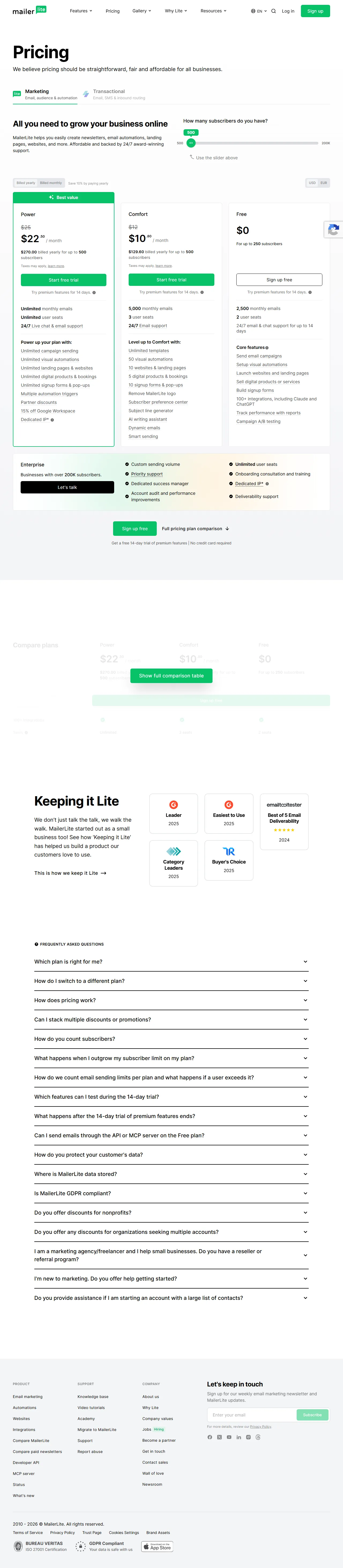
MailerLite pricing page, captured July 2026.

Kit pricing page, captured July 2026.
MailerLite vs Kit at a glance
| Product | Best for | Starting price | Rating | Link |
|---|---|---|---|---|
| MailerLite | Budget-friendly design & simple automation | $0/mo (Free, 250 subscribers, 2,500 sends/mo) | Not yet rated | Visit site |
| Kit | Newsletter automation & audience monetization | $0/mo (Free, up to 10,000 subscribers) | Not yet rated | Visit site |
MailerLite overview
MailerLite
Best for: Solopreneurs who want a clean, affordable email tool without deep automation needs
Starting price: $0/mo (Free, 250 active subscribers, 2,500 emails/mo)
Pros
- Comfort plan starts at just $12/mo for 500 subscribers — one of the lowest real paid tiers around
- Drag-and-drop editor, templates, and landing pages are genuinely well-designed
- Free plan now includes premium templates, blogs, and the HTML editor, previously paid-only extras
Cons
- 2026 free-plan cuts bring the subscriber cap down to 250 and monthly sends down to 2,500
- Automation is rule-based and considerably less sophisticated than Kit's visual builder
MailerLite has long marketed itself as the email tool that doesn’t punish you for being small: a clean visual editor, solid landing pages, and pricing that stays reasonable even on the lower tiers. That reputation took a hit in 2026. Starting June 16, 2026, MailerLite restructured its free plan, and as of July 1, 2026, existing free accounts moved onto the new limits: 250 active subscribers (down from 500) and 2,500 emails per month (down from 12,000) — roughly an 80% cut to sending capacity. Account seats on the free plan actually increased, from 1 to 2, and MailerLite says feature-level caps (3 automations, 3 forms, 1 digital product, 1 landing page, 1 website; campaigns stay unlimited) are set to be enforced starting August 2026, with advance notice to affected users. If you’re over 250 subscribers when that lands, sending campaigns and adding new subscribers manually will stop working until you upgrade or trim your list.
The trade-off: MailerLite opened up some previously paid-only design features to everyone on the free plan, including custom campaign and landing-page templates, blogs, promotional pop-ups, and the HTML campaign editor.
Paid tiers were renamed and repriced in the same June 2026 update: the former “Growing Business” plan is now Comfort, and the former “Advanced” plan is now Power. At the 500-subscriber tier, Comfort runs $12/month (up from $10) and Power runs $25/month (up from $20). At 1,000 subscribers, Comfort is roughly $19/month and Power is roughly $39/month — both increases of 10–30% over 2025 pricing across tiers. Comfort includes 50 automations, 10 combined landing pages and websites, 10 signup forms, and 5 digital products/bookings per the current published limits; Power removes essentially all of these caps and adds unlimited seats. There’s also a custom-priced Enterprise tier for lists above roughly 200,000 subscribers.
Kit overview
Kit
Best for: Creators and newsletter writers who need real automation and want to grow a list for free as long as possible
Starting price: $0/mo (Free, up to 10,000 subscribers)
Pros
- Free plan covers up to 10,000 subscribers with unlimited broadcasts, landing pages, and forms
- Visual, trigger-based automation builder with tagging is more capable than MailerLite's, once you're on a paid plan
- Kit Commerce sells digital products, subscriptions, and tips directly, at standard Stripe processing rates
Cons
- Paid tiers cost more than MailerLite's equivalent tiers and reprice upward as your list grows past 1,000
- Free plan includes only one basic automation and keeps Kit branding on outgoing emails
Kit’s free “Newsletter” plan is the more generous free tier in this comparison by a wide margin: up to 10,000 subscribers, unlimited email broadcasts, and unlimited landing pages and forms, all at no cost. The catch is depth, not scale — free accounts get only one basic visual automation and one sequence, analytics stay basic, A/B testing is unavailable, you’re limited to a single user seat, and Kit branding stays on every email you send.
Paid tiers are metered by subscriber count rather than by feature set. Creator starts at $39/month billed monthly (or $33/month billed annually) for up to 1,000 subscribers, and unlocks unlimited automations, unlimited sequences, and A/B subject-line testing. Creator Pro starts at $79/month billed monthly (or $66/month billed annually) at the same 1,000-subscriber starting point, adding subscriber engagement scoring, deeper analytics, subject-line-and-content A/B testing, Facebook custom audiences, and unlimited team seats. Both tiers reprice upward in steps as your list grows — Creator lands around $59/mo at 3,000 subscribers and around $89/mo at 5,000, for the same feature set you had at 1,000.
Kit also runs Kit Commerce, which sells digital products, subscriptions, and one-time tips directly through email and a hosted product page, at standard Stripe processing rates (Kit itself doesn’t appear to add its own commerce surcharge on top).
Pricing at a glance
(affiliate link)| Plan tier | MailerLite | Kit |
|---|---|---|
| Free plan | 250 active subscribers, 2,500 emails/mo, 2 seats, 3 automations, 3 forms (as of July 2026) | Up to 10,000 subscribers, unlimited broadcasts, only 1 basic automation, Kit branding on |
| Entry paid tier | Comfort, |
Creator, $39/mo ($33/mo annual) — 1,000 subscribers, unlimited automations & sequences |
| Top tier | Power, |
Creator Pro, $79/mo ($66/mo annual) — 1,000 subscribers, scoring, advanced analytics, unlimited seats |
| Growth pricing | Repriced by subscriber tier; increases are moderate step-ups (10-30% higher than 2025 pricing) | Repriced by subscriber tier; e.g., Creator runs ~$59/mo at 3,000 subs, ~$89/mo at 5,000 |
The core shift for 2026: MailerLite is still cheaper than Kit at comparable subscriber counts once you’re paying, but its free plan is no longer a meaningfully “free forever” option for anyone building past a couple hundred subscribers. Kit’s free plan absorbs that early growth instead — you just pay more once you outgrow it and want real automation.
Email marketing & deliverability
Both platforms send reliably and pass through standard authentication (SPF/DKIM) setups, and neither has a reputation for deliverability problems in 2026. The difference is in email creation and reporting polish. MailerLite’s drag-and-drop editor and template library are clean and fast, and the newly free HTML editor and custom templates make the free plan more usable for design-conscious solopreneurs than it was a year ago. Kit’s editor is plainer and more text-forward by design — it’s built around the assumption that a newsletter is mostly written prose, not a heavily designed campaign, which fits creators but can feel bare if you’re used to MailerLite’s or Systeme.io’s more visual templates.
Automation depth
This is Kit’s clearest advantage, and it holds up even against MailerLite’s paid tiers. Kit’s automation is a true visual canvas: branch subscribers based on tags, link clicks, purchases, or form behavior, and build genuinely complex, multi-path sequences without leaving the builder. MailerLite’s automation is capable for straightforward use cases — welcome sequences, simple tag-based branches, abandoned-cart-style triggers on the commerce side — but the logic is more rule-based and linear, and it doesn’t match Kit’s flexibility for elaborate, multi-step journeys.
For a solopreneur running a single welcome sequence and a couple of tagged follow-ups, MailerLite’s automation is entirely sufficient. For someone who wants to route subscribers down meaningfully different paths based on specific behavior, Kit’s ceiling is higher.
Landing pages & forms
Both platforms include landing pages and forms on every tier, including free, and both are reasonably competitive here. MailerLite’s page builder leans into more design flexibility and template variety, plus a basic website/blog builder that Kit doesn’t offer. Kit’s landing pages and forms are simpler but tightly integrated with its tagging and automation system, so a form submission can immediately trigger a specific sequence or tag — which matters more if segmentation is core to your strategy than if you just need a page that converts.
Ease of use
MailerLite is generally considered the more approachable tool for someone who has never used email software before — the interface is organized visually, and building a campaign or landing page feels similar to using a simple website builder. Kit’s interface is organized around your subscriber list and automations first, which is a slightly steeper mental model at first but pays off once you’re managing tags and segments across a growing list.
MailerLite pros and cons
Pros: noticeably cheaper paid tiers at comparable subscriber counts; polished, design-forward editor and templates; includes a basic website/blog builder; recently unlocked premium templates for free users.
Cons: 2026 free-plan cuts (250 subscribers, 2,500 sends/month) make it a poor fit for anyone trying to stay free past early testing; automation logic is simpler and more linear than Kit’s; upcoming feature-level caps (automations, forms, landing pages) add friction for growing free accounts.
Kit pros and cons
Pros: free plan scales to 10,000 subscribers, by far the largest free allowance in this comparison; best-in-class visual, trigger-based automation and tagging; Kit Commerce supports direct-to-audience monetization; strong reputation for deliverability and creator-focused design.
Cons: paid tiers cost meaningfully more than MailerLite’s at equivalent subscriber counts; free-plan automation is minimal (one basic automation) and keeps Kit branding visible; no native website/blog builder.
Who should choose MailerLite
- Solopreneurs on a tight monthly budget who are already past the free tier and want the lowest realistic paid price — Comfort at $12/mo for 500 subscribers is hard to beat on price alone.
- Design-conscious creators who want a polished visual editor, templates, and a built-in landing page or simple website without paying extra for those pieces separately.
- Anyone with simple automation needs — a welcome series and a few tag-based follow-ups — who doesn’t need Kit’s deeper branching logic.
Who should choose Kit
- Anyone trying to grow a list for free as long as possible — Kit’s 10,000-subscriber free ceiling dwarfs MailerLite’s new 250-subscriber cap.
- Creators who depend on precise segmentation and automation — branching sequences based on tags, clicks, or purchases are simply more capable on Kit.
- Solopreneurs monetizing directly through their list via Kit Commerce, who are comfortable paying more once they outgrow the free plan in exchange for automation depth.
FAQ
Did MailerLite’s free plan really get worse in 2026? Yes. Effective July 1, 2026, MailerLite cut its free-plan subscriber cap from 500 to 250 and its monthly send limit from 12,000 to 2,500 emails — roughly an 80% reduction in sending capacity. Account seats increased from 1 to 2, and the free plan gained access to some previously paid-only design features (custom templates, blogs, HTML editor). Feature-level caps (3 automations, 3 forms, 1 landing page, 1 website, 1 digital product) are expected to be enforced starting August 2026.
Is Kit’s free plan actually better than MailerLite’s now? For subscriber count, yes — Kit’s free Newsletter plan covers up to 10,000 subscribers versus MailerLite’s 250. But Kit’s free plan only includes one basic automation and keeps Kit branding on your emails, so “better” depends on whether you value list size or automation depth more at the free tier.
Which platform is cheaper once I’m on a paid plan? MailerLite, in most cases. At 500 subscribers, MailerLite’s Comfort plan runs about $12/month versus Kit’s Creator plan starting near $39/month at the 1,000-subscriber tier (Kit doesn’t offer a distinct lower tier below 1,000 subscribers). MailerLite stays cheaper at comparable subscriber counts as your list grows, though both platforms reprice upward in steps.
Does MailerLite have automation as good as Kit’s? Not quite. MailerLite’s automation covers common use cases well — welcome sequences, simple tag-based branches — but Kit’s visual, trigger-based automation canvas supports more complex, multi-path subscriber journeys. If automation sophistication is your top priority, Kit has the edge even at a higher price.
Can I switch from MailerLite to Kit (or vice versa) without losing my list? Both platforms support CSV import/export of subscriber data, and each offers migration guidance for switching from a competitor. You’ll need to manually rebuild automations, tags, and templates on the new platform, since those aren’t portable between tools.
Bottom line
MailerLite and Kit both aim at solopreneurs, but 2026’s pricing changes moved the goalposts. MailerLite is still the cheaper platform once you’re paying, and its editor and templates remain genuinely pleasant to use — but its free plan is no longer a serious long-term option if you’re trying to grow a list without spending money, now that it’s capped at 250 subscribers and 2,500 sends per month. Kit’s free plan absorbs far more early growth, up to 10,000 subscribers, and its automation ceiling is higher across the board — you just pay a real premium for that once you’re on a paid tier. If your budget is the deciding factor and you’re ready to pay something small, start with MailerLite. If you want to stay free for as long as possible while your list grows, or automation depth matters more than the monthly bill, Kit is the safer starting point. For a broader field of options beyond these two, see our best email marketing software for solopreneurs roundup, and if Kit’s pricing is the sticking point, our Kit (ConvertKit) alternatives guide covers more budget-friendly and feature-alternative picks.